The problem: Coordinating 110 monthly visits in Excel
MSPs are often mission-critical partners to their clients, responsible for maintaining the technology infrastructure that keeps their day-to-day operations running. Part of this role includes sending technicians on-site to clients for routinely scheduled check-ins, maintenance, and updates. When you have over 100 clients, scheduling these visits becomes a big job.
That was the situation at this MSP. Every month, an experienced operator coordinated more than 110 on-site client visits for 8 technicians. The MSP already had access to scheduling software, but configuring it around the company's scheduling rules was complex and time-consuming.
As a result, the operator continued building the entire schedule the way they had always done it: in a locally saved Excel spreadsheet.
For every visit, they had to account for:
- The client's preferred days and times
- How frequently the client needed a visit
- Technician availability and time off (recorded in a separate HR system)
- Keeping each technician's client visits within a 30-minute drive-time radius
- Internal rules about which technicians should work with certain clients
Many of these details were not documented together. The operator relied on their experience and previous versions of the spreadsheet. This made the process difficult for anyone else to manage and left the MSP dependent on a single person.
After building the schedule, they emailed every client and technician to confirm each visit. A client requesting another time, an upcoming holiday, or a technician conflict could trigger another round of changes. Moving one appointment could affect several others, and a single mistake could take hours to correct.
Even when everything went smoothly, the process took around 35 hours each month, or approximately 20% of the operator's working time. To reduce this workload, the MSP worked with Third South Solutions to turn its scheduling rules into a tool the operator could run on their own.
The solution: Building a scheduler around the operator's real workflow
The goal was never to replace the person scheduling, but instead to do the first 80% of the scheduling work to free up their team for higher-value tasks. For this operator, that meant spending more time speaking with clients, where their experience was most valuable, and less time moving appointments around in Excel.
With that goal in mind, Third South Solutions began with a 30-minute scoping session and the operator's original Excel spreadsheet. By reviewing the existing process, the team could see what information the operator collected, how they assigned visits, and which rules guided their decisions.
10 days later, Third South Solutions delivered the first working demo. The operator tested it and identified exceptions and working practices that were not visible in the spreadsheet. Their feedback helped the team refine the scheduling logic, improve the interface, and consider how another team member could eventually use the tool.
The operator was open to the project from the start. Seeing their feedback reflected in each version gave them more confidence in the tool. 2 weeks after the first demo, Third South Solutions delivered the final tool.
The solution combined two layers:
- A rule-based engine that built the core schedule
- An AI layer that suggested options when conflicts appeared
The rule-based engine handled the repeatable part of the process. It applied the MSP's requirements to create the initial schedule. Because it followed clear rules, the operator could understand why each visit had been assigned and change anything that did not work.
Once the core scheduler was working as expected, Third South Solutions added AI to help with conflicts.
For example, if a client preferred an afternoon visit but no afternoon slot was available, the AI could suggest moving the visit to the morning and identify which other appointments would also need to change. The AI did not apply those changes automatically. The operator reviewed each suggestion and decided whether to apply it.
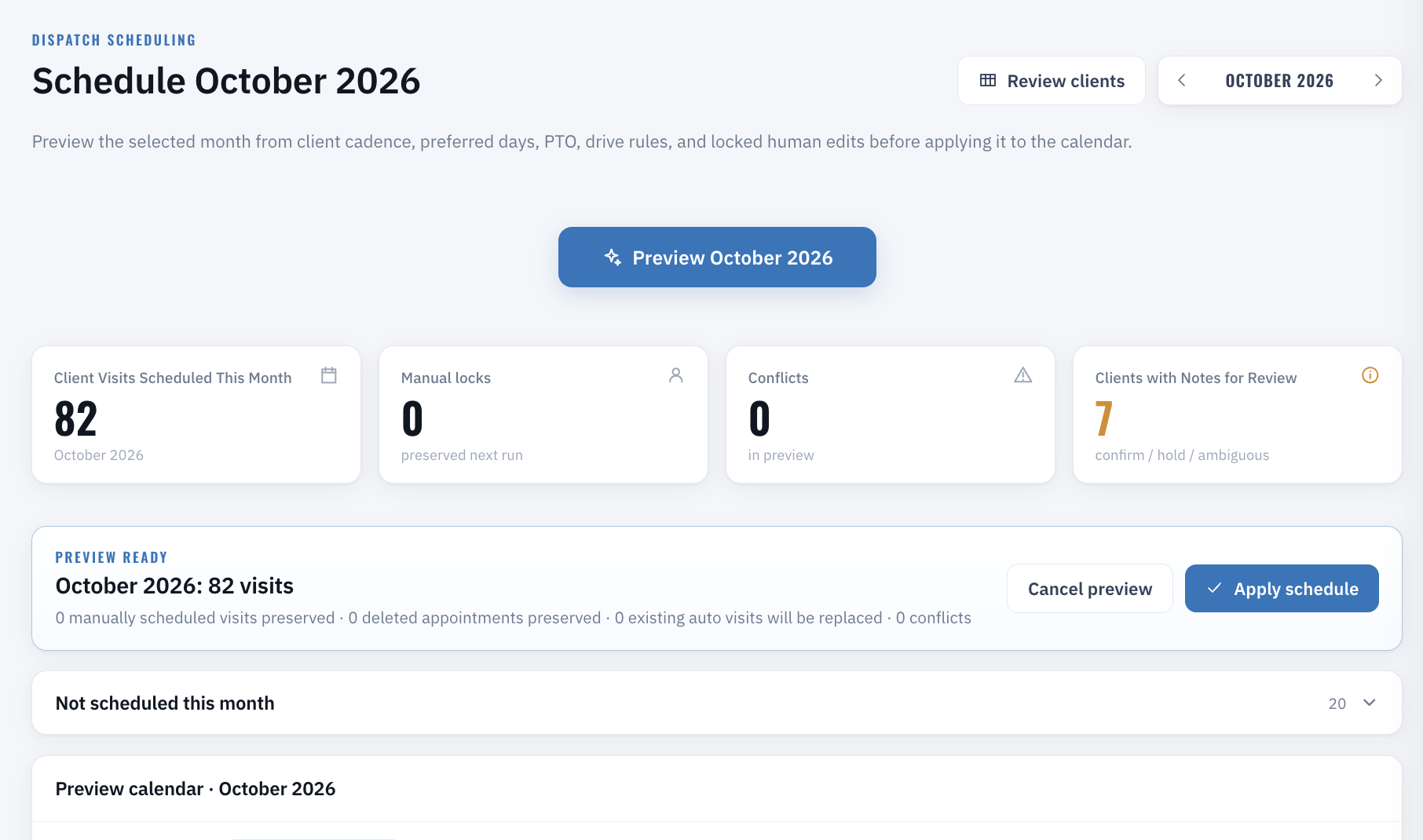
The final product was a browser-based tool that brought the full process into one place. It included:
- A dashboard for reviewing the monthly schedule
- Monthly and weekly calendar views
- Drag-and-drop rescheduling
- Individual technician schedules with time off
- A service-area map showing where each technician would travel
Every manual change triggered a review flag showing its consequences before the operator confirmed it. Nothing was reassigned without their approval.
The application was also packaged as a single encrypted, self-contained file, preventing client names from being exposed through the site hosting the tool.
The result: Cutting monthly scheduling from 35 hours to under 3
With the new tool, the operator can shrink their time investment in visit coordination from 35 hours a month to under 3 hours, ultimately saving around 400 hours each year. The under-3-hour process includes reviewing conflicts, making schedule changes, sending emails, and handling client responses to cancellations or rescheduling.
The biggest change is how the operator can now use their time. Instead of spending hours updating Excel and coordinating changes through individual emails, they can focus on supporting clients through the customer service desk and keeping technicians informed about new client developments.
The operator remains responsible for the schedule, while the repetitive work no longer takes up a large part of their month.
"Before, I built the schedule by hand in Excel and sent every confirmation email one at a time. Now, the tool creates the initial schedule, and I can review conflicts and approve changes before anything is applied. The full process has gone from around 35 hours a month to under 3."
Operator, Managed Services Provider
This project is emblematic of Third South Solutions' approach to AI and automation: using technology to give experienced employees more capacity while keeping them in control of the processes they understand best. In this case, the operator can manage a critical workflow more efficiently and spend more time supporting the clients and technicians who rely on them.
What manual process is slowing down your team?
If a critical workflow still depends on spreadsheets and one person's knowledge, Third South Solutions can help you turn it into software your team can run and own.